
Correspondence settings in a store's website admin determine who will appear as the sender of all correspondence with customers, derived from email and order templates. This setting is configured on a store by store basis.
This setting is only available to Administrators of the Fulfillment Center. Affiliate store administrators, other than the Fulfillment Center, will not have access to this setting.
Prerequisites
- You must have administrator access to use this feature
- This feature is only available on multi-store plans
To Configure Correspondence Settings:
- Log into your DecoNetwork Website.
- Browse to Admin > Websites.


- Select Manage for the website you want to configure.

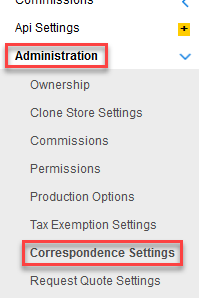
- Click Administration, then Correspondence Settings.
- Tick the All Correspondence comes from Fulfillment Center (not store) checkbox if you want the Fulfillment Center to appear as the sender of all correspondence.
Leave the checkbox un-ticked if you want the affiliate store owner to appear as the sender of all correspondence.
In both cases, the affiliate store branding will still be used within the templates.

Still have questions? Use the Search Tool at the top of the page to find more related guides. Need help? Click the icon to submit a support ticket – our Client Services team is ready to assist!
Comments
0 comments
Please sign in to leave a comment.