
Meta descriptions and keywords play a critical role in how search engines interpret and rank your website. By configuring these SEO elements in DecoNetwork, you help search engines better understand your content, improve your visibility in search results, and attract more relevant traffic to your store.
In this tutorial, you'll learn how to set up meta descriptions and keywords to help your site get discovered by the right audience.
In this article
- Prerequisites
- Why configure Keywords & Meta Data?
- How to add Keywords & Meta Data
- Best-practice tips
- Troubleshooting
- FAQs
- Additional resources
Prerequisites
- You must have Administrator or Web Developer access
- A basic understanding of Search Engine Optimization (SEO) is recommended
Why configure Keywords & Meta Data?
Search engines rely on metadata to determine what your pages are about. By adding targeted keywords and compelling meta descriptions, you improve how your site is indexed and displayed in search results.
- Improve visibility: Help your pages rank higher in search results
- Attract the right audience: Reach users actively searching for your products
- Increase click-through rates: Well-written descriptions encourage users to visit your site
- Strengthen SEO performance: Provide clear signals about your page content
How to add Keywords & Meta Data
- Log into your DecoNetwork account.
-
Navigate to Admin → Websites.
- Click
next to the website you want to configure.
Step 2: Open SEO tools
-
Select SEO Tools → Keyword & Meta Data in the menu at the right.
Open the Keyword & Meta Data section under SEO Tools
Step 3: Enter your metadata
-
Enter a meta description for your website pages.
- Meta descriptions are limited to 170 characters
- Use clear, descriptive language that reflects the page content
-
Enter relevant Keywords, separated by commas.
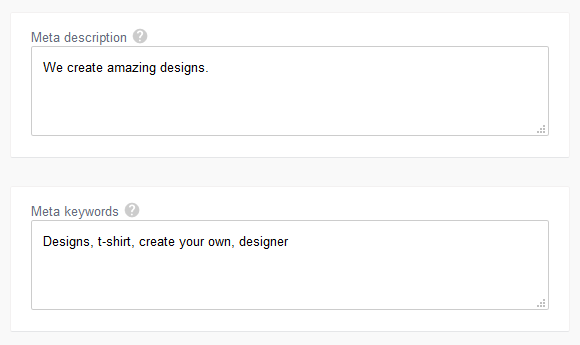
Enter your meta description and keywords
Step 4: Save your changes
- Click Save to apply your changes.
- Click Cancel if you do not want to keep your edits.
Best-practice tips
- Write for humans first: Make descriptions compelling and readable
- Use relevant keywords: Focus on terms your customers actually search for
- Avoid keyword stuffing: Overloading keywords can hurt SEO performance
- Keep descriptions concise: Stay within the 170-character limit
- Match page intent: Ensure metadata accurately reflects the page content
Troubleshooting
My page isn’t appearing in search results
- SEO changes can take time to be indexed by search engines
- Ensure your keywords and description accurately reflect your content
My meta description is being cut off
- Keep your description under 170 characters
- Place the most important information at the beginning
Keywords don’t seem to be helping rankings
- Focus on relevance rather than quantity
- Combine keywords with high-quality page content
FAQs
Do meta keywords still matter?
Meta keywords are less important than they used to be, but they can still help organize your SEO strategy internally. Focus primarily on strong meta descriptions and page content.
How long does it take for SEO changes to take effect?
Search engines may take days or weeks to re-index your pages after changes are made.
Can I use the same meta description on multiple pages?
No. Each page should have a unique meta description to avoid duplicate content issues and improve SEO performance.
What makes a good meta description?
A good meta description clearly explains the page content, includes relevant keywords, and encourages users to click through to your site.
Additional resources
Still have questions? Use the Search Tool at the top of the page to find more related guides. Need help? Click the icon to submit a support ticket—our Client Services team is ready to assist!
Comments
0 comments
Please sign in to leave a comment.