
If your products are using the default system decoration areas, you can enable decoration processes on decoration areas in bulk. Decoration areas are the areas on a product that can be decorated. DecoNetwork has pre-defined sets of standard decoration areas for a range of popular product types. Each of the product types that have common decoration areas forms a product category. You can reconfigure the default decoration categories and decoration areas to suit your business practices and equipment as required.
Prerequisites
- You must have administrator access to use this feature
To enable a decoration process on decoration areas in bulk:
- Log into your DecoNetwork Website
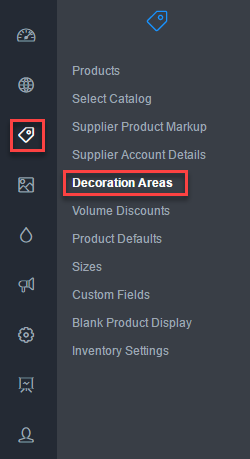
- Browse to Admin > Products.
- Select Decoration Areas.

The main work area contains a list of existing product decoration categories that may be edited or added to.
Click the image to enlarge.
- Click Edit next to the category you want to configure.
The Edit Area popup shows a list of defined decoration areas for the category.
- Tick the checkboxes of the processes you want to enable for each decoration area.
- A decoration area with the checkbox ticked will make the area on the product available for decoration.
- The small graphic displays the location of the decoration area on the product.
- When you are done, click Save.
Still have questions? Use the Search Tool at the top of the page to find more related guides. Need help? Click the icon to submit a support ticket – our Client Services team is ready to assist!
Comments
0 comments
Please sign in to leave a comment.