
Waste management is very important in terms of improving efficiencies and reducing costs associated with modern production environments. DecoNetwork provides a facility to track and analyze waste associated with the production jobs. This tutorial leads show you the steps to determine the quantity of waste on a production job by using the History tab within Business Hub. The following steps will give a better understanding of your production processes and an opportunity to optimize them.
Prerequisites
- You must have Administrator, Production Manager, or Production Team permission to use this feature.
To determine the waste amounts on a production job:
- Log into your DecoNetwork website.
- Browse to Business Hub > Production.
Click the image to enlarge.
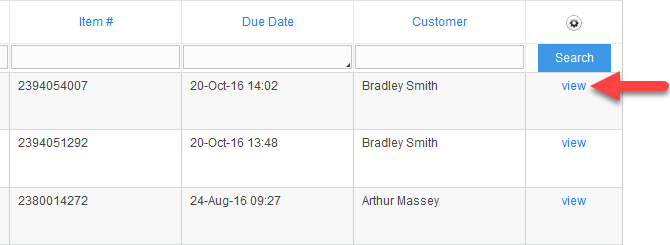
- Click view to load the job item you want to view the history of.
- Click on the History tab.

A table of all the past production actions performed on the job is displayed.
-
Identify all the waste logs and sum up all the quantities noted in the waste logs.
Still have questions? Use the Search Tool at the top of the page to find more related guides. Need help? Click the icon to submit a support ticket – our Client Services team is ready to assist!
Comments
0 comments
Please sign in to leave a comment.