
If you are setting up or updating your website, you may wish to prevent visitors from accessing it. You can do this by configuring the settings so that visitors to your website must be logged in to view the website.
Prerequisites
- You must have administrator access to use this feature
Watch the following video for instructions on how to prevent access to your website.
The following guide details the procedure for restricting access to your website.
- Log into your DecoNetwork Website.
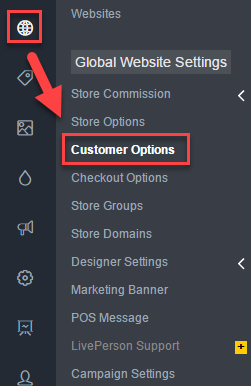
- Browse to Admin > Website(s).
Select Customer Options.

The main work area contains the settings which can be configured:
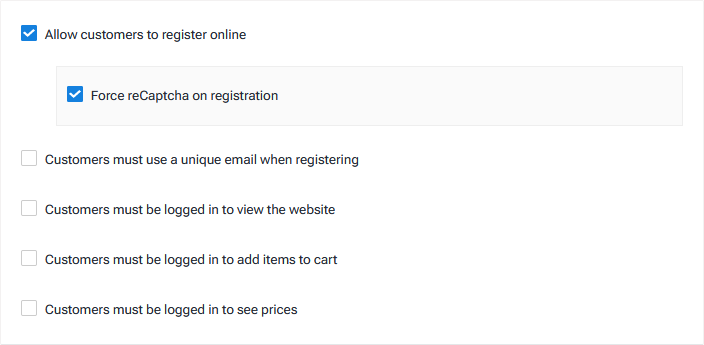
- Tick the Customers must be logged in to view the website option.
This requires the customer to be logged in to interact with the website. You have the choice of allowing the customer to create a unique login account or to log in using a generic site password.
- Select the Customers can login using a generic password option.
A Generic password field will be displayed.
- Specify a password that visitors of your must enter to access the website.
- Click Save.
When this option is set, the Private Login page will be displayed when the customer first visits the website.
Still have questions? In your DecoNetwork Admin, use the Universal Search box in the top bar to find more related help guides. Need more help? Click the icon next to the search box to open the help menu and submit a support ticket. Our Client Services team is ready to assist!
Comments
0 comments
Please sign in to leave a comment.