Shipping Label - Pre-Print / make sorting and packing easier
Under Consideration
We went through the process of making a custom "Shipping Label"
with the store name, order number, and customer contact info to make packing and labelling orders easier for pickup as individual or bulk stores (like schools)
The problem is it is only available to print AFTER a shipping notification has been sent
- Ideally, this option can be ON before the order is complete
- The label can be printed early
- then when an item is ready to pack it has a label ready to apply
- since these labels aren't actually used for shipping, they should be renamed PACKING LABEL
- Bulk stores, could have these pre-printed and ready to apply when packing orders, to toss in to a bulk box, for bulk pickup
- then after the bulk is picked up a pickup notification can be sent out
- otherwise people are looking for their order before the bulk is picked up
-
Adding these function to the Order Actions at the right side, for Hub orders, and Campaign/Batch Store orders, can make a huge difference with production
- order sheet, shipping label (packing label) can be included with the product through the production process
- the shipping label in your system still should be renamed Packing Label - so it's not confused with actual Shipping Labels (from our delivery services)
- in Campaign, Batch stores, being able to select multiple orders and export more in one PDF, just like the work sheets, we can send one file to the printer vs one-by-one
- including printing the packing slips out for campaigns so orders can be coordinated much smoother.
- Mass email customers after the orders are packaged and picked up in bulk (like a school) they are all notified AFTER the person responsible has picked up all oders
- then pick up notifications aren't sent and people looking for orders that have not actually been picked up and ready to distribute yet
- no more "is my order ready" or "i tried to pickup my order, but they don't have it yet, why"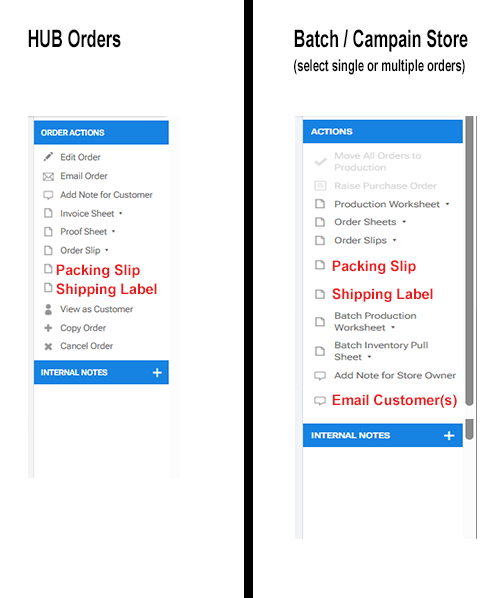 Comment actions
Please sign in to leave a comment.
Comments
1 comment